tracking mistake!!

Mitglied
Posts: 9
Joined: 23.08.2015
Hi I am known here as Guitarzan. I have been with wikiloops for sometime and I love collaborating and sharing my uploads.But I screwed the pooch the other day when uploading a new song for remixing.I could'nt have done it more wrong. Instead of 1 track for the members i created 3 tracks for one song Track ID#328741-328742. These are wrong and i have tried to delete them. I understand wikiloops policy on remixes. But I am the only contributor and no other member has uploaded any remixes I tried to red flag them but it wont clear them. I dont want members to confuse them and am uploading a new track this evening. is there someone i can get to help me clear these tracks???
Guitarzan
Guitarzan
+2

SUPPORTER
Posts: 953
Joined: 14.02.2018
These are gone already. If you still see them, it could be coming from your browser's cache I guess?
Cheers, wjl
Cheers, wjl
+3

Ernie Ball 2221 Regular Slinky Gitarrensaiten
Saitensatz für E-Gitarre

5,90 €
iThis widget links to Thomann, our affiliate partner. We may receive a commission when you purchase a product there.
Shop besuchen
Mitglied
Posts: 9
Joined: 23.08.2015
thank you for your reply...I am still having problems though!!! for example... if upload the drum track...then it gives me a track #....ok. then when i want to do a remix and add another instrument it doesnt remix to that track...it gives me a whole new track# as if i started a new template. now i have 2 seperate tracks for the same song all i want to do is upload or remix my different instruments so collaborators can hear the idea but remove whatever instruments they want when they download..
thank you
thank you
SUPPORTER
Posts: 953
Joined: 14.02.2018
I think that is like it's intended. Take for instance moonchild's track #286097 with the title "somehow". I remixed that and added my bass, and after uploading it as a remix of hers, it became #300426 with my newly edited title "It ended, somehow...".
You can still add your own solo instrument as a HD file if you wish - that is how I read the knowledge base under https://www.wikiloops.com/knowledge/index.php
You can still add your own solo instrument as a HD file if you wish - that is how I read the knowledge base under https://www.wikiloops.com/knowledge/index.php
Mitglied
Posts: 9
Joined: 23.08.2015
thank you again for your time. I hope i,m making myself clear...I know its kinda confusing. my goal is to create a template with all the instruments and give people the op-tion to remove which ever part they want so they can put theirs in their

SUPPORTER
Posts: 301
Joined: 02.06.2018
Here's a track I uploaded when I was new to the site in 2018
#142696
I started by uploading a drum track. Then I remixed that track and added my guitar
Then I remixed that track/mix of drum and guitar and added a synth in a new mix. Finally I took that mix and added another synth in a final remix. Four uploads total. If some wanted to remix drums only they would just use my first upload, if they wanted to remix drums with guitar they'd use my second upload and so on. I think what you're asking is If someone wanted to remix for example the final upload but replace one of the instruments with their own.
#142696
I started by uploading a drum track. Then I remixed that track and added my guitar
Then I remixed that track/mix of drum and guitar and added a synth in a new mix. Finally I took that mix and added another synth in a final remix. Four uploads total. If some wanted to remix drums only they would just use my first upload, if they wanted to remix drums with guitar they'd use my second upload and so on. I think what you're asking is If someone wanted to remix for example the final upload but replace one of the instruments with their own.
+2
Mitglied
Posts: 9
Joined: 23.08.2015
i wrote a song and tracked it on my daw. ok...so i created a template with drums only. i got a track ID#....example Track ID 12345.... ok then i wanted to remix the bass. so i pull up the track id and i do a remix upload. when that is complete it gives me another track ID# and i now have 2 seperate tracks instead of 1 track that i remixed into now i have track id#12345 and another track 12346. but the bass is in that track and my drums in the other...they are not together as 1. i figure there is something im not seeing.
thank you
thank you
+1

SUPPORTER
Posts: 342
Joined: 19.03.2022
Think about it this way:
Your target is have a song made up of 3 different tracks with instruments A, B and C.
In your DAW you have the 3 separate instrument tracks.
Step one, upload track A. (No need for the additional HD upload, as the first track is separate anyway)
Step two, create a mix in your DAW of track A and track B. Upload that mix as a remix to your first upload. In addition, upload track B only as the "optional high quality single track file" (which is what the HD track is all about).
Step three, create a mix of the composite A/B mix with track C in your DAW. Upload that mix (which now consists of all your instrument tracks) as a remix to your last upload and in addition upload track C as a HD single track file.
The result is that we now have a track tree with track A as the root, a mix of A/B as the first mix iteration and A/B/C as the second iteration. In addition we have B and C as separate HD files. Job done.
I think you just have to imagine that what you`re doing by yourself is done by three different people. The second musician will want your track A, mix his instrumnet track to that and upload the result, plus his individual solo track (as HD) and musician no 3 will take the mix result from musician two, create a mix from that and his track and also make his sperate track available.
Hope that helps.
Your target is have a song made up of 3 different tracks with instruments A, B and C.
In your DAW you have the 3 separate instrument tracks.
Step one, upload track A. (No need for the additional HD upload, as the first track is separate anyway)
Step two, create a mix in your DAW of track A and track B. Upload that mix as a remix to your first upload. In addition, upload track B only as the "optional high quality single track file" (which is what the HD track is all about).
Step three, create a mix of the composite A/B mix with track C in your DAW. Upload that mix (which now consists of all your instrument tracks) as a remix to your last upload and in addition upload track C as a HD single track file.
The result is that we now have a track tree with track A as the root, a mix of A/B as the first mix iteration and A/B/C as the second iteration. In addition we have B and C as separate HD files. Job done.
I think you just have to imagine that what you`re doing by yourself is done by three different people. The second musician will want your track A, mix his instrumnet track to that and upload the result, plus his individual solo track (as HD) and musician no 3 will take the mix result from musician two, create a mix from that and his track and also make his sperate track available.
Hope that helps.
+5
the t.bone Ovid System CC 100
Condenser Clip Microphone for Ovid System

49 €
iThis widget links to Thomann, our affiliate partner. We may receive a commission when you purchase a product there.
Shop besuchen

Mitglied
Posts: 541
Joined: 04.07.2020
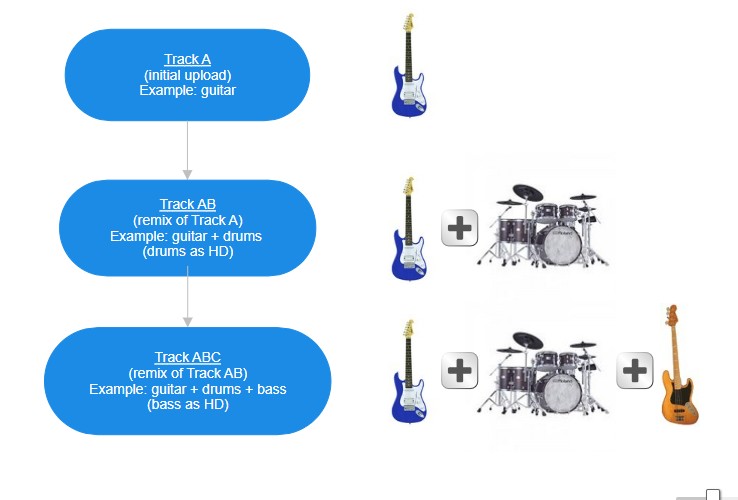
how you order and separate the tracks is up to you, since you are doing the initial combining of everything. you would have various versions exported and upload accordingly. say guitar by itself and nothing else, then a remix of just guitar and drums (your remix would be a file of just the guitar and drums, you can then include the drums as HD), then a remix of guitar, drums, and bass (bass as HD)...and so on :)
i did a quick visual as well :) cheers!
rootshell attached the following image:
i did a quick visual as well :) cheers!
rootshell attached the following image:
+3
wikiloops online jamsessions wird präsentiert mit freundlichem
Support von:

Hi Wikiloops, dank jullie wel voor deze ongelofelijke leuke site. Je speelt wereldwijd samen met fantastische muzikanten Heel inspirerend.
FMH